Airflow
In Airflow, we define Directed Acyclic Graphs (DAGs) that build our data-processing pipelines. These DAGs are composed of multiple operators, each serving a specific task. Within Kaapana, we categorize operators into two types: local operators and processing-containers.
Furthermore, Airflow functions as the scheduling system for the jobs. The Airflow user interface offers comprehensive insights into DAGs, DAG runs, and their scheduling details.
The platform comes with several preinstalled DAGs and a large set of custom operators. Additional DAGs can be installed as ẁorkflow-extensions in the Extensions page.
Preinstalled DAGs
collect-metadata
This DAG collects metadata from the DICOM files in the selected dataset and stores it in the project bucket in MinIO.
import-niftis-from-data-upload
This DAG converts NIfTI files to DICOM format and imports them into the internal PACS system. More details can be found here.
delete-series
This DAG deletes the all series in the dataset from the project.
If any series only belongs to the selected project, it will be deleted from the internal PACS system.
The option Delete entire study allows to delete all series correspoding to each study in the dataset.
Warning
The option Delete entire study might delete a series, even if it does not belong to the dataset.
download-selected-files
Warning
This DAG is deprecated and will be removed in the future.
This DAG will create a zip file containing the series in the dataset and stores it in the project bucket in MinIO.
evaluate-segmentations
This DAG is designed to compare two sets of segmentations, a ground truth and a prediction. All of the segmentations should be in the same dataset, the distinction between ground truth and test data is done via a test_tag. More information about tagging data can be found in Datasets. Note that you can either tag images manually, or use tag-dataset workflow to apply to an entire dataset.
Additionally, the DAG also contains a preprocessing step to fuse several annotation labels into a new unique label for better label specification. This fusion operation can be done for both the test data and the ground truth data.
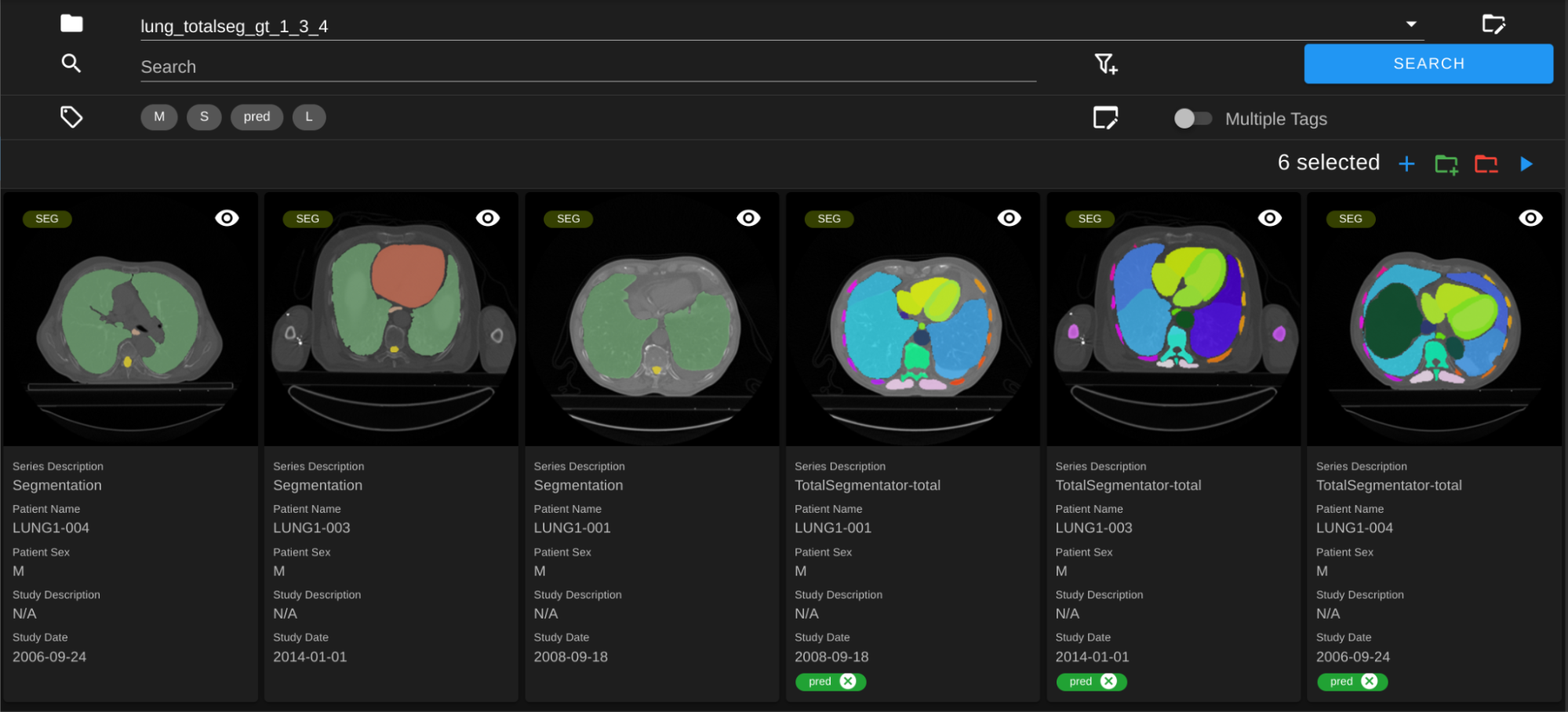
As an example, let’s say you run a DAG like TotalSegmentator on CT data and get predicted segmentations. First, you can create a new test dataset with all new segmentations (by filtering for Series Description, and more, to get all relevant segmentations and click on Save as Dataset). Then you can go to this dataset and run tag-dataset DAG. Now that all the predicted segmentations are tagged, you can create a new dataset with ground truth segmentations. After selecting this gt dataset, you can click on the Add to Dataset button to add the test dataset on top of it.
Select the dataset that contains both test and gt segmentations. In the screenshot below, the predicted segmentations from TotalSegmentator are tagged with “pred”.
In the workflow form, fill in the parameters as follows:
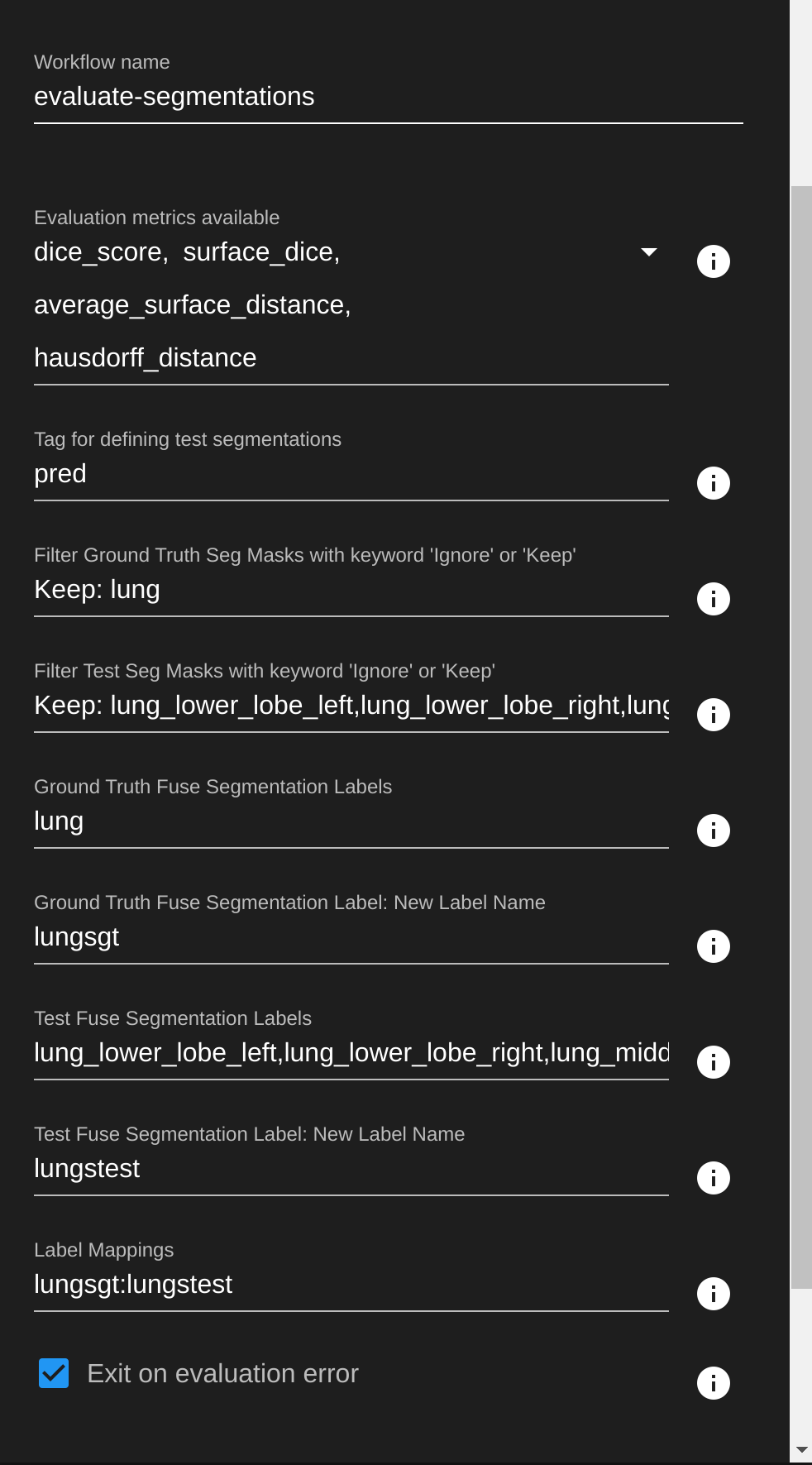
Evaluation metrics available: select the metrics you want to run on the data. More details about the metrics can be found in Monai Metrics docs .
Tag: the tag that you use to separate ground truth from predictions, for this example we use
pred.Filter GT: for filter operator, use
KeeporIgnoreto specify annotation labels that you want to filter in ground truth data. You can check the annotation labels of data by double clicking on them in Datasets view. Can also leave empty if you want to use all labels in the downstream operators.Filter Test Seg: same with test data. Here we only select the ones we are interested in, because TotalSegmentator generates a lot of segmentations that are not useful for us in this case.
GT Fuse Labels: the label(s) that you want to fuse into a new label. In this example we are fusing
lunglabels (each segmentation has two with same name)GT Fuse New Label Name: the name of the new label created by fusing the labels above.
lungsgtfor this example. Note that all the special characters will be removed from this label.Test Fuse Labels: same with test data. In the example here we are fusing all the lung parts into a single “lungstest” label
Test Fuse New Label Name: same with test data
Label Mappings: in the format of
gtlabelx:testlabely,gtlabelz:testlabelt, include all the label mapping that you want to evaluate from GT and test data.
In Minio, the metrics.json file containing the results should be available under
evaluate-segmentationsfolder.
 {
     "1.2.276.0.7230010.3.1.3.17448391.39.1711634044.28207": {
         "dice_score": {
             "lungsgt:lungstest": [
                 0.9780710339546204
             ]
         },
         "surface_dice": {
             "lungsgt:lungstest": [
                 [
                     0.5737958550453186
                 ]
             ]
         },
         "hausdorff_distance": {
             "lungsgt:lungstest": [
                 [
                     25.475479125976562
                 ]
             ]
         },
         "asd": { // average surface distance
             "lungsgt:lungstest": [
                 [
                     0.44900786876678467
                 ]
             ]
         }
     },
     ...
 }
import-dicoms-from-data-upload
This workflow expectes a zip file containing DICOM files as input. The zip file must first be uploaded via the Data Upload.
The DAG will extract the zip file and send all DICOM files to the internal ctp server with selected project and the specified dataset name attached as --aetitle kp-<dataset-name> --call kp-<project-name>.
The ctp server will trigger DAGs service-process-incoming-dcm.
send-dicom
This DAG can be used to send DICOM files to another DICOM receiver, e.g. to another Kaapana platform.
Important
If you send data to another Kaapana platform, you have to specify the project name as kp-<project-name> and the dataset name as kp-<dataset-name>.
service-daily-cleanup-jobs
This DAG runs automatically every night to clean up the platform and perform the following tasks:
* kaapana.operators.LocalCleanUpExpiredWorkflowDataOperator to delete workflow directories for expired workflows.
* kaapana.operators.LocalCtpQuarantineCheckOperator to check the quarantine folder of the CTP and trigger service-process-incoming-dcm if files were found.
* kaapana.operators.LocalServiceSyncDagsDbOperator to synchronize the DAGs in the Airflow database with the DAGs in the file system.
* Clean old log files in the Airflow log directory.
service-email-send
This dag consists only of the kaapana.operators.LocalEmailSendOperator.
service-process-incoming-dcm
This DAG is triggered automatically whenever data is sent to the DICOM receiver of the platform. It processes incoming DICOM data and performs the following tasks:
Collect metadata from the DICOM files and store it the project index in OpenSearch. (This steps is also done for the _admin_ project.)
Store the DICOM files in the internal PACS.
Create series-project mappings for all incoming series to the associated project. (This steps is also done for the _admin_ project.)
Generate thumbnails for all series and store them in MinIO. (This steps is also done for the _admin_ project.)
Validate the DICOM files. Validation warnings and errors are stored as metadata and visible in the Gallery View. HTML reports are stored in MinIO. (This steps is also done for the _admin_ project.)
Downstream DAGs will be triggered if specified for the
kaapana.operators.LocalAutoTriggerOperator.
service-re-index-dicom-data
This DAG can by triggered manually from the Airflow webinterface to repopulate the PACS, Opensearch, and the access-information-interface database from DICOM data stored on the file system. This step can be helpful, when migrating from an older version of Kaapana to a newer one.
tag-dataset
This DAG will add or remove tags from the series in the selected dataset. The tags are stored in the OpenSearch index of the project and can be used to filter series in the Gallery View.
tag-seg-ct-tuples
This DAG expects a dataset of series with modalities _SEG_ or _RTSTRUCT_. It will add the specified tags to all series in the dataset and corresponding reference series. The tags are stored in the OpenSearch index of the project and can be used to filter series in the Gallery View.
tag-train-test-split-dataset
This DAG expexts a dataset of segmentation series. It will split the dataset into a training and a test dataset based on the specified Train split. Then it will tag all series of both splits according to the specified Training tag and Test tag.
validate-dicoms
This DAG allows users to validate the DICOMS against the DICOM standard. Currently this DAG allows one of the two algorithms to validate DICOMS: dciodvfy and dicom-validator. Validation results are stored in MinIO as a result file. The DAG runs each time data is imported into the platform.
clear-validation-results
This DAG can be used to clear the validation result from the Dataset.